Federal construction projects require contractors to protect Controlled Unclassified Information (CUI) in every tool they use, including their construction management software. That means your project management platform must operate within a FedRAMP Authorized environment, your cloud data practices must align with CMMC 2.0 compliance requirements, and your audit trail must be complete enough to survive a third-party assessment. This checklist breaks down exactly what that means in practice.
CMMC and FedRAMP Compliance Summary
- Cybersecurity Maturity Model Certification (CMMC) 2.0 is no longer a future concern; Phase 1 began November 10, 2025, and most DoD contracts will require CMMC compliance within the current four-phase rollout.
- Any cloud tool that stores, processes, or transmits Controlled Unclassified Information (CUI) must be FedRAMP Authorized at the Moderate baseline or equivalent.
- The compliance obligation flows down: prime contractors are responsible for ensuring their subcontractors also operate within compliant systems.
- Your construction management software is inside the compliance boundary, so choosing a non-compliant tool creates real legal and contract risk.
- ProjectTeam for Government is FedRAMP Authorized at the Moderate Impact Level and is purpose-built to support federal construction programs and CMMC compliance.
Federal construction projects have always come with layers of oversight. Bonding requirements, Davis-Bacon wage rules, Buy American provisions, and so on. Experienced federal construction contractors know to plan for these upfront, but there's a newer layer of compliance that many organizations are still catching up to: cybersecurity.
The data generated by a federal construction project, such as drawings, specifications, contracts, submittals, RFIs, etc., frequently qualifies as Controlled Unclassified Information. And CUI, by federal mandate, must be protected wherever it lives. That includes your project management software.
With Cybersecurity Maturity Model Certification (CMMC) 2.0 now in active implementation and FedRAMP the established standard for federal cloud environments, contractors who haven't addressed their software stack face real risk: lost contract eligibility, failed audits, and False Claims Act exposure for self-attestation that doesn't hold up. This isn't a future concern, it's the current operating environment.
The CMMC compliance checklist below is designed to give federal construction contractors a clear view of what's required and where to focus attention. It's not legal advice, you should always work with counsel and a qualified assessor for your specific situation, but it is a practical starting point for getting your program compliance-ready.
Understand the Framework Before You Build the Checklist
Before getting into line-item requirements, it helps to understand how the key frameworks relate to each other. The terminology gets conflated, and confusion here leads to gaps in your compliance approach.
What is CMMC 2.0 Compliance?
The Cybersecurity Maturity Model Certification is a DoD framework that verifies defense contractors have adequate cybersecurity controls to protect CUI and Federal Contract Information (FCI). It operates at three levels:
- Level 1 — 15 basic cybersecurity practices. Self-attestation permitted. Applies to contractors handling FCI only.
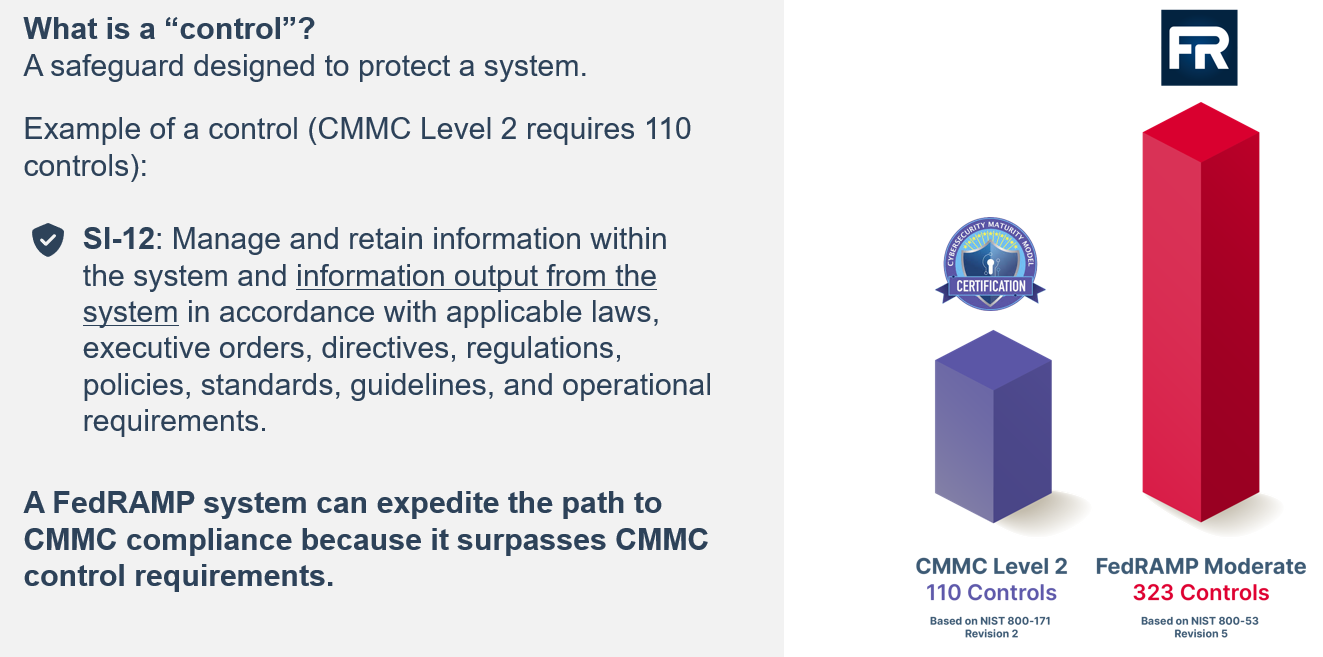
- Level 2 — 110 security practices aligned to NIST SP 800-171. Applies to most contractors handling CUI. Third-party assessment (C3PAO) required for most contracts.
- Level 3 — Advanced controls for the most sensitive programs. Government-led assessment required.
Phase 1 of the CMMC DFARS rule took effect November 10, 2025. Most new DoD solicitations will include CMMC compliance requirements as the four-phase rollout continues through the coming years.
What is FedRAMP compliance?
FedRAMP (Federal Risk and Authorization Management Program) is a government-wide standard for cloud services. Any Software-as-a-Service platform that stores, processes, or transmits CUI must be FedRAMP Authorized, or the contractor must verify the platform meets FedRAMP Moderate Equivalency through its own assessment, which is a far heavier lift.
For CMMC Level 2 and Level 3 compliance, cloud tools used to handle CUI must be at FedRAMP Moderate or higher. If a contractor is using a FedRAMP Authorized platform, they are not responsible for the platform's compliance, the authorization covers it. If the platform is not FedRAMP Authorized, the contractor bears the burden of proving equivalency.
NIST SP 800-171
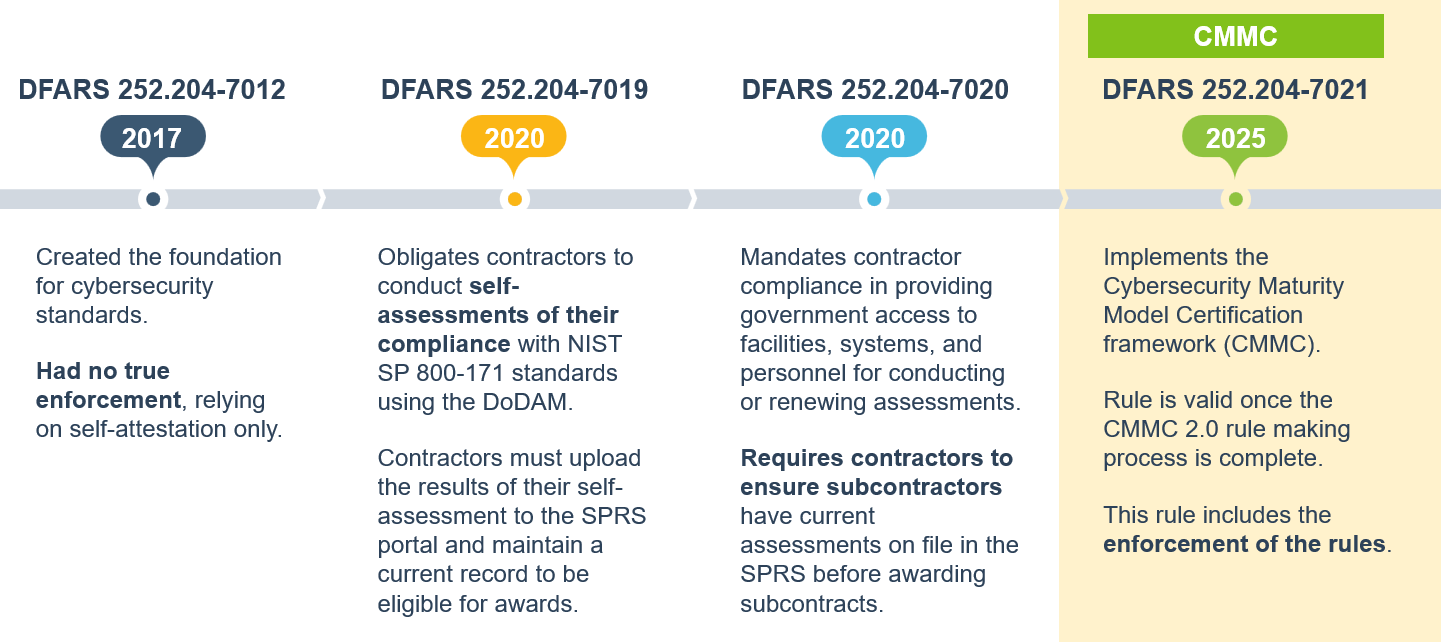
NIST 800-171 defines the 110 security requirements that underpin CMMC Level 2. It has been a contractual requirement under DFARS 252.204-7012 since 2017. If your organization has been meeting DFARS obligations, your baseline should be strong, but CMMC formalizes assessment and enforcement in ways that self-reported compliance did not.
The Federal Construction CMMC Compliance Checklist
Use this checklist to assess your current posture and identify gaps before your next DoD contract award or third-party assessment.
A. Know Your CUI Boundary
- Identify all data types generated by your project that may qualify as CUI (drawings, specs, contracts, submittals, personnel data, cost data tied to sensitive programs).
- Determine which systems, platforms, and tools that CUI flows into or through.
- Document your CUI boundary: the scope of systems that must meet compliance requirements.
- Ensure your scope is realistic: many contractors over-estimate their boundary initially, but under-scoping is a compliance risk.
B. Verify Your Cloud Tools Are Compliant
- Inventory every cloud-based tool that accesses, stores, or transmits CUI, including your construction management software, document storage, email, and communication tools.
- Confirm each tool's FedRAMP authorization status on the official FedRAMP Marketplace (marketplace.fedramp.gov).
- For any tool without FedRAMP authorization, determine whether it meets FedRAMP Moderate Equivalency and document your assessment. This is a significant compliance burden that most organizations want to avoid.
- Replace or retire any non-compliant tool that handles CUI before your next contract phase or assessment cycle.
C. Manage the Downstream Flow-Down Obligation
- Identify all subcontractors and downstream partners who will access or handle CUI on your project.
- Include CMMC flow-down language in subcontracts (as required under the DFARS rule).
- Verify that subcontractors are using compliant tools or ensure they access project data only through your FedRAMP Authorized environment.
- Avoid approaches that require downloading or re-entering data into non-compliant systems to share with subs.
D. Build and Maintain Your Audit Trail
- Ensure your project management software logs all user actions, document access, and data changes with timestamps and user attribution.
- Confirm that audit logs are tamper-evident and cannot be modified by users.
- Configure role-based access controls so users see only the data they're authorized to access.
- Store access logs in a location that is also within the FedRAMP authorization boundary.
E. Document Your System Security Plan (SSP)
- Develop and maintain a System Security Plan that maps your implemented controls to NIST 800-171 requirements.
- Ensure the SSP accurately reflects your actual technical environment. Discrepancies between documentation and implementation are a common assessment failure point.
- Update the SSP when tools, workflows, or personnel change.
- Be prepared to share your SSP with prime contractors and C3PAOs. This is increasingly requested as part of supply chain due diligence.
F. Prepare for Third-Party Assessment (C3PAO)
- Identify a Certified Third-Party Assessor Organization (C3PAO) before assessment is required, not after.
- Complete a gap assessment against NIST 800-171 controls and develop a Plan of Action and Milestones (POA&M) for any open items.
- Enter your self-assessment score in the DoD's Supplier Performance Risk System (SPRS).
- Ensure continuous CMMC compliance. This requires annual attestation and a C3PAO assessment every three years at Level 2.
Why Your Construction Management Software Is the Critical Variable
Many organizations focus their compliance efforts on IT infrastructure, think firewalls, endpoint management, identity systems, etc. That work matters, but it often overlooks one of the most CUI-dense environments in a federal construction program: the project management platform. Project management software in construction handles an enormous volume of sensitive data on federal jobs, and its compliance status is rarely the first thing teams audit.
Think about what flows through a construction management software: design documents, specifications, contract modifications, RFIs with project-sensitive details, submittals, cost reports, and correspondence. On a federal project, much of this is CUI. If that data lives in a platform that isn't FedRAMP Authorized, you have a compliance gap, regardless of how strong the rest of your security posture is.
The Subcontractor Problem
One of the most common sources of compliance exposure in federal construction isn't the prime, it's the downstream flow. When subcontractors need access to project documents, the instinctive approach is to email files or share folders in a consumer cloud tool. Both of those actions move CUI outside the FedRAMP authorization boundary and create a compliance gap that flows back to the prime.
ProjectTeam's connected collaboration model is built specifically to address this. Rather than emailing files or creating external copies, subcontractors and downstream partners access project data directly within ProjectTeam's FedRAMP Authorized environment with role-based permissions that control exactly what each user can see and do. CUI never leaves the authorization boundary, and the prime maintains a full audit trail of who accessed what and when.
Full Functionality, Not a "Government Edition"
Some platforms offer stripped-down "government editions" that meet compliance requirements but sacrifice the features and flexibility that make the tool useful. That's a real trade-off, one that often leads teams to work around the compliant system, defeating the purpose.
ProjectTeam delivers the full breadth of its construction management capabilities (RFIs, submittals, change orders, Gantt scheduling, cost tracking, custom forms and workflows) within the FedRAMP Authorized environment. There is no feature penalty for compliance. Teams managing federal programs get the same connected, no-code-configurable platform as commercial projects, without having to choose between security and functionality.
No-Code Configuration Means Compliance-Ready Workflows
Federal projects often have unique documentation requirements, approval chains, and audit structures that differ from commercial work. A platform that requires custom development to accommodate those needs creates cost and delay every time something changes.
ProjectTeam's no-code configuration lets project teams build custom forms, configure workflows, and set up approval chains without IT or developer involvement. For federal projects, that means you can align your project workflows, such as specific submittal approval chains, controlled document routing, configurable access permissions, directly to compliance requirements without a lengthy implementation project or reliance on a vendor's professional services team.
Common Government Contractor Compliance Mistakes in Federal Construction
Even well-intentioned compliance programs have predictable failure points. Here are the ones that come up most often in federal construction environments:
Assuming your platform vendor handles compliance for you. FedRAMP authorization means the platform's environment is compliant. It does not mean your configuration of the platform is automatically compliant. Role-based access, data handling practices, and workflow design are still your responsibility.
Over-scoping or under-scoping your CUI boundary. Getting scoping wrong is one of the most common (and costly) mistakes. Scoping too broadly creates unnecessary compliance burden. Scoping too narrowly creates gaps that assessors will find. Work with your assessor to get this right before building your compliance program around it.
Treating self-attestation as low-stakes. Self-attestation carries legal weight. Certifying CMMC compliance in SPRS while knowingly operating non-compliant systems creates False Claims Act exposure. The standards for what counts as "knowing" are broader than many contractors realize.
Relying on email and consumer file-sharing for project data. Email and tools like Dropbox, Google Drive, or consumer-grade SharePoint are not FedRAMP Authorized for this purpose. Using them to share CUI, even temporarily, takes data outside the authorization boundary.
Waiting for contract language before starting. CMMC requirements are now flowing into contracts. Contractors who aren't already compliant when a solicitation includes CMMC clauses will be unable to bid or will face a rushed, expensive remediation effort.
Frequently Asked Questions
Does CMMC apply to all federal construction contracts, or just DoD?
CMMC in its current form is a DoD framework; it applies to DoD contractors and subcontractors that handle CUI or FCI. Other federal agencies have their own cybersecurity requirements, but CMMC is specifically a defense industrial base program.
That said, FedRAMP applies government-wide: any contractor using cloud tools to handle federal data across any agency needs to verify their tools' compliance status.
What's the difference between FedRAMP Authorized and FedRAMP Moderate Equivalency?
FedRAMP Authorized means a cloud service provider has completed the formal FedRAMP authorization process, been assessed by an accredited third party, and is listed on the FedRAMP Marketplace.
FedRAMP Moderate Equivalency means a provider claims their security controls meet the Moderate baseline, but hasn't gone through formal authorization. If you're relying on equivalency, your organization is responsible for assessing and documenting that the platform actually meets the standard, which is a significant compliance burden. Using a formally FedRAMP Authorized platform like ProjectTeam.com removes that burden entirely.
Do flow-down obligations apply to every subcontractor on a federal project?
Flow-down requirements apply to subcontractors that will store, process, or transmit CUI or FCI as part of the contract. Subcontractors who do purely physical work and never handle project data may not be in scope, but any sub who accesses drawings, specifications, submittals, or contract documents likely is. Prime contractors are responsible for flowing down the requirements and for verifying that their subs are compliant.
How often do we need to reassess our compliance?
CMMC Level 2 requires annual self-attestation and a third-party C3PAO assessment every three years for most programs. Beyond that, your compliance posture should be treated as a living program — not a point-in-time certification. Any time your tooling, personnel, or workflows change in ways that affect your CUI boundary, your documentation and controls need to be updated to reflect that.
Can we use ProjectTeam.com for both commercial and federal projects?
Yes. ProjectTeam.com delivers its full feature set across both commercial and federal environments. Teams don't need to manage two separate platforms or accept reduced functionality on government work. Whether your portfolio includes federal programs, commercial projects, or both, ProjectTeam.com gives you a single, connected construction management environment that scales with your program.
What if our subcontractors are using non-compliant tools?
This is one of the most common compliance gaps in federal construction programs. If subcontractors are accessing CUI through non-compliant tools, that data is leaving your authorization boundary. The solution isn't to find compliant tools for every sub, it's to give subs access to your compliant environment directly. ProjectTeam's connected collaboration model allows subcontractors to work within the same FedRAMP Authorized platform, with permissions configured to limit their access to only what they need. CUI stays within the boundary, and the prime maintains a full audit trail.
The Window to Get Ahead of This Is Now
Federal construction compliance isn't approaching, it's already here. CMMC Phase 1 is active, FedRAMP is the established standard, and contractors who aren't prepared are already at a disadvantage when competing for DoD work.
The good news is that compliance and operational excellence are not in tension. The right software makes your projects easier to manage and keeps your data within the authorization boundary, without asking your team to choose between productivity and security.
See ProjectTeam in action.
ProjectTeam is FedRAMP Authorized at the Moderate Impact Level and listed on the FedRAMP Marketplace. It's purpose-built for the full construction lifecycle (RFIs, submittals, change orders, cost tracking, Gantt scheduling, and more) with the no-code flexibility to match your compliance workflows and the connected collaboration model that keeps CUI within the authorization boundary, all the way through your subcontractor chain. Request a demo to see how federal construction teams use ProjectTeam.com to stay compliant and competitive.