Switching construction project management software raises the same questions every time: What data transfers over? What happens to your forms? How does the team learn the new platform? And how long does it all take? This article answers those questions by following a single RFI from the old system into a new construction management software platform, using ProjectTeam.com as the working example.
How to Switch Construction Software Summary
- The first decision is what data transfers over. A team migrates the active records it needs and archives the rest.
- Existing forms and workflows carry over, rebuilt to match the way a team already works.
- Training happens by role in a single session, and each person is back to work by the time it ends.
- The timeline belongs to the team. The move goes as fast as decisions get made and data gets exported, and live projects keep running throughout.
- ProjectTeam handles configuration, training, and record imports, while the buying organization provides process decisions, project data, and the pace of the move.
What a Construction Software Transition Actually Involves
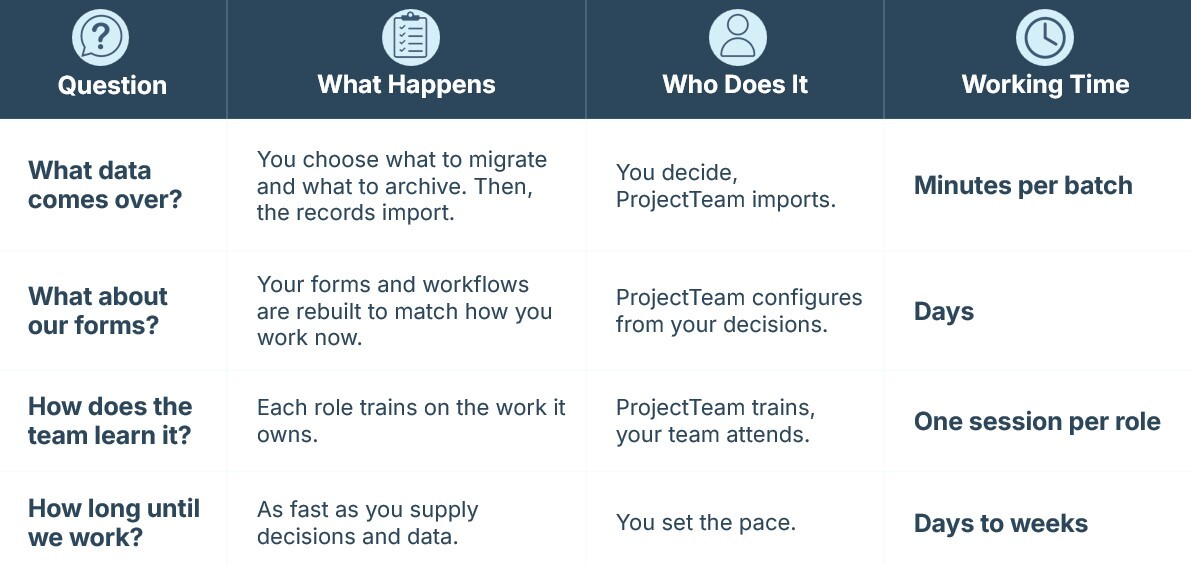
A software switch involves decisions from the buying organization and work performed by the implementation team. The table below shows how those responsibilities divide across the transition and how each part contributes to the overall timeline.
Why Teams Evaluate Alternative Construction Platforms
Construction teams rarely evaluate a new construction management platform for a single reason. Some want workflows that better reflect the way they operate. Others want more visibility across projects, greater flexibility in how records move, stronger security requirements, or a modern platform that can grow alongside the organization. And for many, it comes down to cost: platforms priced against revenue or project volume get more expensive as the business grows, whether or not usage does.
The common thread is that the team believes a different platform will support the work more effectively than the one it uses today. Once that decision is under consideration, attention shifts from selecting software to planning the transition itself.
What Construction Data Comes Over?
Every software move starts with scope. Before any records change systems, the team decides what belongs in the new platform and what stays behind as archived history.
You Decide What Project Data to Migrate
Most teams take a practical approach. Active projects and the records still in play come over. Older records from completed work often remain in the current system, where they are still available if anyone needs them. The result is a focused migration built around the information the team uses every day.
How Your Project Records Import
Once that scope is set, the mechanics are straightforward. The current system exports its records to a spreadsheet, and that spreadsheet imports into the platform. In ProjectTeam.com, the implementation team manages that import as part of professional services.
RFIs leave the old system as a row in an export file and arrive in ProjectTeam.com as a working record. A hundred RFIs can import in a single batch, and the team creates "RFI 101" the same day, continuing the log in the platform.
Records with unusually large volumes of data or more complex history follow a second path built for that volume.
What Happens to Your Existing Records, Forms and Workflows?
A software switch works best when the team can continue using the processes it already knows. The forms people fill out every day, and the approval paths those forms follow, carry into the platform through configuration.
Configuration Rebuilds Your Existing Workflows
Take a single RFI, for example. It already has a structure: fields that team members complete, information they provide, and a routing process that moves the RFI from question to answer.
Configuration rebuilds that structure in the platform. The fields, approval paths, and workflows are set up to match the process the team already uses, based on the decisions provided by the team’s administrators.
In ProjectTeam.com, the implementation team handles that configuration with no code and no charge for adding forms or fields. The RFI form your team uses today becomes an RFI form in the platform created around the same process.
Every Construction Record Type Carries Over
An RFI is only one example. Any construction management system holds a collection of records that move through defined workflows every day:
- RFIs and submittals
- Drawings and specifications
- Field reports and daily logs
- Punch lists
- Change orders and related project records
Owners, general contractors, designers, and construction managers all interact with these records in different ways, which is why the forms and workflows need to reflect the process the project already uses.
Each record type is configured to match the version the team already uses. When users move into the platform, they continue working with familiar forms, fields, and approval paths.
How Prior Setup Supports Data Migration
The fields created during setup become the destination for the records imported later.
When the team exports data from its current system, each column in that export aligns with a field already in place in the platform. The decisions made during setup allow for that alignment ahead of time, which is why this work happens before migration.
When records arrive, the forms, fields, and workflows they belong in are already waiting for them.
How Does Your Project Team Learn the New Platform?
Training focuses on the work people perform on the project every day. Each group learns the part of the platform that supports its responsibilities, so the transition from training into project work stays short and practical.
Construction Software Training Runs by Role
Construction projects bring together owners, general contractors, designers, and construction managers. Each group uses the platform differently, so training follows those same roles.
Owners learn how to track project activity, review records, and maintain visibility across the work. General contractors learn how to manage RFIs, submittals, and coordination activities. Designers focus on reviews, responses, and project communication. Construction managers learn the workflows, approvals, and oversight functions that keep work moving across the project. Training adjusts to what each team needs, so a session covers the records and workflows that matter most to the people in the room.
In ProjectTeam.com, each group attends a session focused on the records, workflows, and approvals it uses most often.
Training Uses Your Current Project Workflows
The platform people see during training already reflects the way the project works. Forms, fields, and workflows were prepared during implementation, so users train in the same environment they will use after go-live.
Because the process is already familiar, training focuses on using the platform rather than redesigning the work itself.
How Long Does a Project Management Software Transition Take?
The individual activities in a software transition move quickly. The overall timeline comes from preparation, decisions, and implementation scope.
Configuration, Training, and Migration Times
Each part of the transition has its own working time.
- Configuration runs in days.
- Training runs in one session per role.
- Batch imports run in minutes.
Those are the working times attached to the implementation itself.
Your Team Controls the Project Timeline
The full timeline depends primarily on two inputs from the buying organization: configuration decisions and project data.
A team that arrives with decisions made and records ready for export moves through the process quickly. A team still deciding how approvals should flow spends more time in configuration. The process stays the same in either case. The difference comes from when those decisions are available.
Live projects continue throughout the transition. Teams keep working in their current system while configuration, training, and data preparation move forward. The switch happens when the platform is ready to take over, giving the team a clear handoff from one system to the next.
Planning Your Construction Software Platform Migration
The transition works because each step prepares the next one:
- Teams decide what records belong in the new platform.
- Forms and workflows are set up around the way the project operates.
- Project records move into the new platform.
- Owners, general contractors, designers, and construction managers learn the workflows they use every day.
The result is a move that follows a clear sequence from start to finish. As a construction management software platform, ProjectTeam.com is built to support that transition with configuration that matches existing workflows, role-based training, and implementation services that manage the move from one system to the next. To see how the process would apply to your projects, request a demo.